





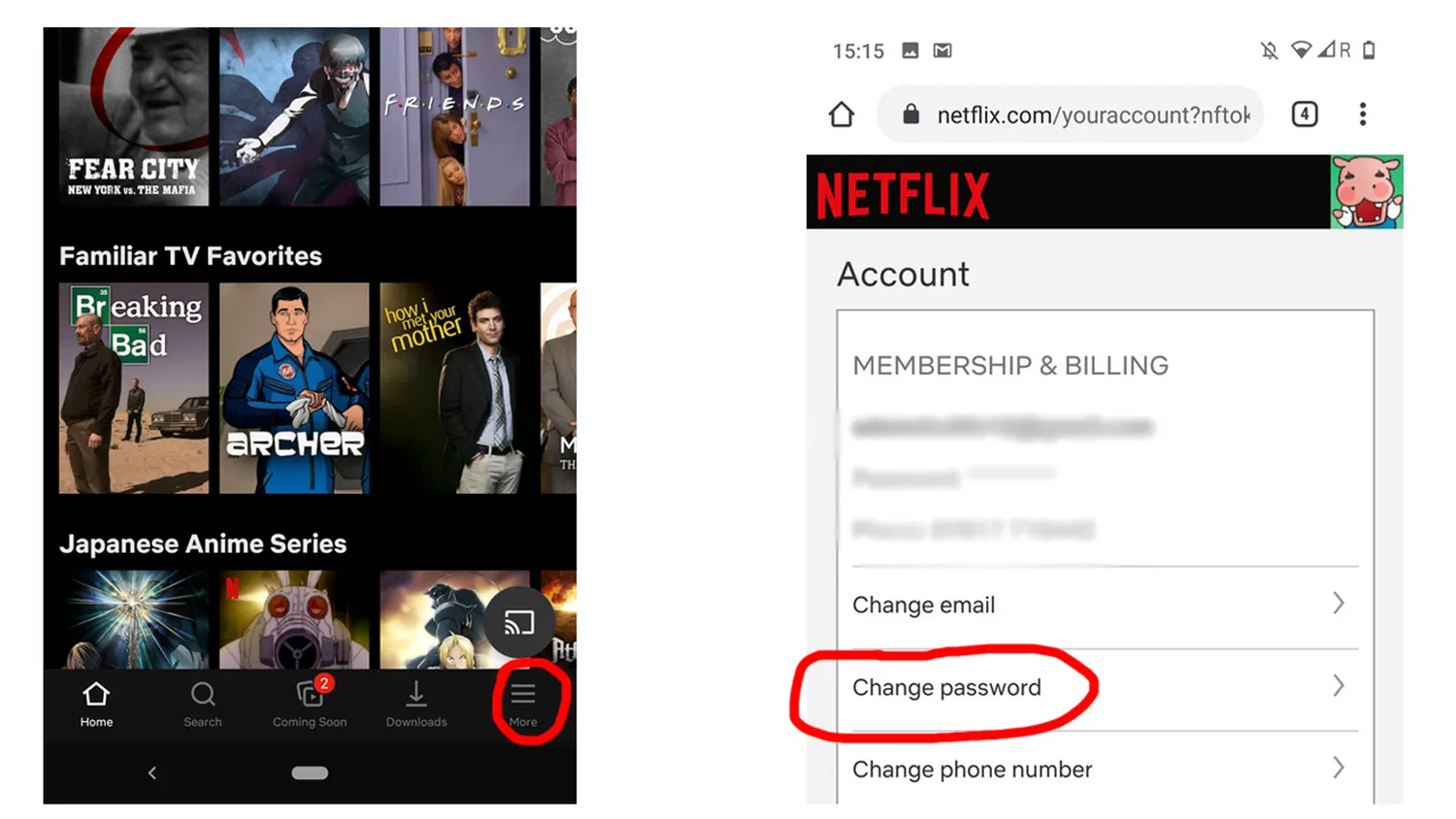
Learning how to change netflix password on phone devices is one of the easiest ways to keep your streaming profile secure. Whether you want to remove unwanted users sharing your subscription or you simply want to upgrade to a much stronger alphanumeric code, managing your account details straight from your smartphone is quick. Since your password safeguards your personal preferences, streaming data, and linked payment methods, keeping it fresh protects your home network privacy.
In this comprehensive guide, we will break down the precise mobile steps required for both Android and iPhone systems. Additionally, if you find your account getting too cluttered with old activity after updating your profile, you can learn how to delete netflix watch history on tv or mobile screens to clean up your interface. Let us dive directly into the official process.
Mobile Security Overview
Updating your account details from a handheld screen takes less than three minutes. Netflix uses a seamless unified system across platforms, which means that changing your security keys on a smartphone automatically logs out or prompts an update on all smart televisions, desktop engines, and connected game consoles. If you are experiencing unexpected drops in streaming quality due to multiple users streaming simultaneously, running a swift password update is the absolute best remedy.
| Method | Time Needed | Requirements |
|---|---|---|
| In-App Settings | 2 Minutes | Active App Login |
| Mobile Web | 3 Minutes | Email or SMS Access |
How to Change Netflix Password on Phone App
The most straightforward method to alter your details is by navigating directly through the official application interface. Follow these steps carefully:
- Launch the Netflix App: Tap the application icon on your mobile dashboard and select any primary user profile.
- Navigate to My Netflix: Locate and tap the My Netflix option sitting at the bottom right corner of the screen layout.
- Open the Settings Menu: Tap the triple horizontal lines or your specific profile gear icon found near the upper portion of your phone screen.
- Select Account: Tap on the Account choice. The system will securely load your profile dashboard configuration details through an integrated web link wrapper.
- Enter Security Section: Tap the option labeled Change Password under the primary membership management headers.
- Save New Credentials: Input your old string, type in your newly created unique combinations, check the box to force global device sign-outs, and tap the Save button.
Pro Tip: Always make sure to check the box that says "Require all devices to sign in again with new password". This ensures any old phones or televisions belonging to friends or ex-roommates are dropped instantly from your billing circle.
If you run into issues while cleaning up your profile or decide the subscription plan is no longer matching your budget requirements, you can easily discover how to cancel netflix subscription on phone to handle billing directly from the exact same account management screen.
Changing Password via Mobile Web Browser
Sometimes the application can fail to refresh due to regional cache configurations or lack of updates. If this happens, you can easily access your details using a standard browser like Safari or Google Chrome by visiting the official Netflix Account Portal.
- Open your favorite smartphone mobile web application.
- Go directly to the official account link and sign in using your active user credentials.
- Scroll down past your monthly plan descriptions to the Membership & Billing area.
- Tap on the blue Change password text string link.
- Confirm your identities, supply the strong password modification, and finalize your settings updates.
Once your security configuration settings are locked down tightly, finding premium movies becomes your next priority. To track down hidden high-rated films without spending hours browsing aimlessly, check out our guide on how to find good movies to watch on netflix.
What to Do If You Forgot Your Password
If you cannot remember your active key, changing it requires an identity verification process. On the main login screen, tap the text that asks Need help? or Forgot Password?. Netflix will safely ask you to select either an automated recovery message delivered directly to your registration email address or a swift verification code sent through a phone SMS notification.
Once you enter the secure code received on your mobile screen, you will be directed straight to a screen allowing you to set up a brand new password without needing to recall your historical account string.
Frequently Asked Questions (FAQs)
Will changing my password stop unauthorized screen sharing?
Yes, as long as you tick the box requiring all associated hardware setups to sign back in with the updated credentials, everyone else will lose instant access.
Why does the app open a web browser to complete this process?
Netflix uses secure background browser redirects to manage user passwords and billing settings. This extra layer ensures your highly sensitive personal tokens remain completely encrypted away from device memory caches.
How often should I change my Netflix streaming password?
Security experts suggest changing your core online streaming credentials every six months to effectively minimize account exploitation or data leaks.
Conclusion
Knowing how to change netflix password on phone interfaces places complete security right at your fingertips. By leveraging either your dedicated mobile software app or any standard mobile browser, you can easily secure your account details in a couple of minutes. Keep your streaming profile secure, control who has access to your screens, and enjoy uninterrupted entertainment on your phone.